Navigation
Navigator導航選單有三種方式:
- Stack
- BottomTab
- Drawer
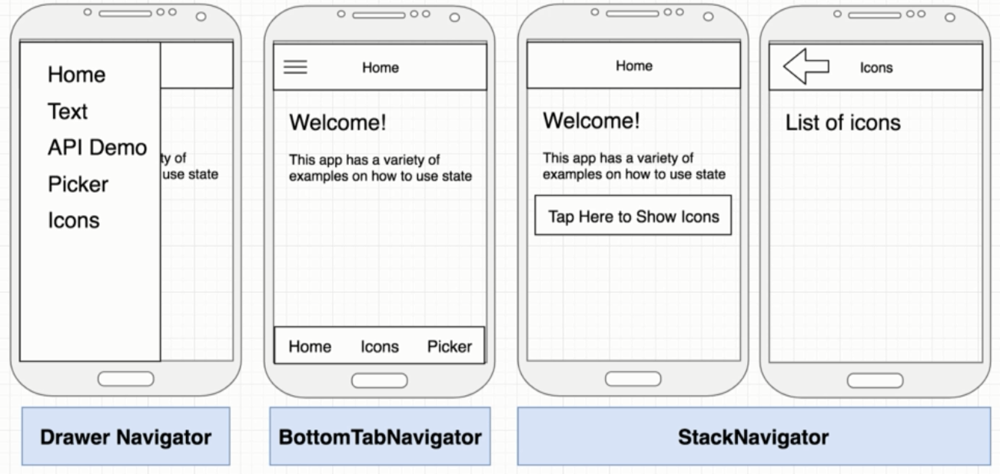
安裝Navigation套件
npm install @react-navigation/native
//expo install react-native-gesture-handler react-native-reanimated react-native-screens react-native-safe-area-context @react-native-community/masked-view
//after 2023
npx expo install react-native-screens react-native-safe-area-context
安裝Stack Navigator套件
npm install @react-navigation/stack
//do not skip this step, or your app may crash in production even if it works fine in development
npx expo install react-native-gesture-handler

// Create 2 files

gesture-handler.native.js
// Only import react-native-gesture-handler on native platforms
import 'react-native-gesture-handler';

gesture-handler.js
// Don't import react-native-gesture-handler on web

//Now, add the following at the top (make sure it's at the top and there's nothing else before it) of your entry file, such as index.js or App.js:
import './gesture-handler';
StackNavigator範例
import React from 'react';
import {View, Text, StyleSheet, Button} from 'react-native';
import { NavigationContainer  } from '@react-navigation/native';
import { createStackNavigator } from '@react-navigation/stack';

const Tweet = ({navigation}) => {
  return (
    <View>
      <Text>Tweet</Text>
      <Button
        title="Go to detail"
        onPress={() => navigation.navigate("TweetDetail", {id:1} )} />  	//Master可以透過navigate導向Detail
    </View>
  );
};

const TweetDetail = ({route}) => {
  return (
    <View>
      <Text>Tweet Detail {route.params.id} </Text>				//Detail可以透過route.params來取得Master傳過來的值
    </View>
  );
};

const Stack = createStackNavigator();
const StackNavigator = () => (
  <Stack.Navigator screenOptions={{headerStyle:{backgroundColor:'red'},headerTintColor:'white'}}>	//修改header的顏色
    <Stack.Screen name="Tweet" component={Tweet} options={{title:'推特'}} />
    <Stack.Screen name="TweetDetail" component={TweetDetail} options={{title:"推特內容"}} />
  </Stack.Navigator>
);

const App = () => {
  return (
    <NavigationContainer>
      <StackNavigator />
    </NavigationContainer>
  );
}

export default App;
安裝BottomTab Navigator
npm install @react-navigation/bottom-tabs
加上BottomTabNavigator
import React from 'react';
import { NavigationContainer} from '@react-navigation/native';
import { createBottomTabNavigator } from '@react-navigation/bottom-tabs';
import { MaterialCommunityIcons } from '@expo/vector-icons';

import HomeScreen from './src/screens/HomeScreen';
import ProfileScreen from './src/screens/ProfileScreen';

const Tab = createBottomTabNavigator();

export default function App() {
  return (
    <NavigationContainer>
      <Tab.Navigator
        screenOptions={({route})=>({
          tabBarIcon: ({color, size, focused}) => {
          const icons = {Home:focused ? 'home':'home-outline' , Profile: focused ? 'account':'account-outline'};
          return <MaterialCommunityIcons name={icons[route.name]} color={color} size={size} />
          }
       })}
       tabBarOptions={{activeTintColor:'red',}}
      />
      <Tab.Screen name="Home" options={{title:"主頁"}} component={HomeScreen} />
      <Tab.Screen name="Profile" options={{title:"帳號"}} component={ProfileScreen} />
    </NavigationContainer>
  );
}
安裝Drawer Navigator
npm install @react-navigation/drawer
加上Drawer Navigator
import React from 'react';
import { NavigationContainer} from '@react-navigation/native';
import { createDrawerNavigator } from '@react-navigation/drawer';
import { MaterialCommunityIcons } from '@expo/vector-icons';

import HomeScreen from './src/screens/HomeScreen';
import ProfileScreen from './src/screens/ProfileScreen';

const Drawer = createDrawerNavigator();

export default function App() {
  return (
    <NavigationContainer>
      <Drawer.Navigator/>
      <Drawer.Screen name="Home" options={{title:"主頁"}} component={HomeScreen} />
      <Drawer.Screen name="Profile" options={{title:"帳號"}} component={ProfileScreen} />
    </NavigationContainer>
  );
}
Stack+Tab Navigator加在一起
import React from 'react';
import {View, Text, StyleSheet, Button} from 'react-native';
import { NavigationContainer  } from '@react-navigation/native';
import { createBottomTabNavigator } from '@react-navigation/bottom-tabs';
import { MaterialCommunityIcons } from '@expo/vector-icons';

const Tweet = ({navigation}) => {
  return (
    <View>
      <Text>Tweet</Text>
      <Button
        title="Go to detail"
        onPress={() => navigation.navigate("TweetDetail", {id:1} )} />
    </View>
  );
};

const TweetDetail = ({route}) => {
  return (
    <View>
      <Text>Tweet Detail {route.params.id} </Text>
    </View>
  );
};

const Stack = createStackNavigator();
const FeedNavigator = () => (
  <Stack.Navigator screenOptions={{headerStyle:{backgroundColor:'red'},headerTintColor:'white'}}>
    <Stack.screen name="Tweet" component={Tweet} options={{title:'推特'}} />
    <Stack.screen name="TweetDetail" component={TweetDetail} options={{title:"推特內容"}} />
  </Stack.Navigator>
);

const Account = () => <View><Text>Account</Text></View>;

const Tab = createBottomTabNavigator();
const TabNavigator = () => (
  <Tab.Navigator
    tabBarOptions={{
	  activeTintColor:'red',
	  inactiveTintColor:'black',
    }}>
    <Tab.screen name="Feed" component={FeedNavigator} options={{tabBarIcon: ({size,color}) => <MaterialCommunityIcons name="home" size={size} color={color}>}} />
    <Tab.screen name="Account" component={Account} />
  </Tab.Navigator>
);

const App = () => {
  return (
    <NavigationContainer>
      <TabNavigator />
    </NavigationContainer>
  );
}