Firebase
- 什麼是Firebase
- 建立專案及app名稱
- app安裝firebase
- 建立firebase連接
- Enable Google Sigin
- Sigin按紐
- 建立資料庫
- 從App新增使用者
- 允許註冊帳號 Allow Email Signup
什麼是Firebase
- Firebase 是一個同時支援 Android、iOS 及網頁的 app 雲端開發平台,協助 app 開發者在雲端快速建置後端服務,提供即時資料庫
- 開發(Develop):即時資料庫(Realtime database)、身分驗證(Authentication)、雲端訊息(Cloud Messaging)、主機(Hosting)、檔案儲存(Storage)、及遠端配置(Remote Config)
- 成長(Grow):訊息推播(notifications)、app 索引功能(App Indexing)、動態連結(Dynamic Links)、email 及 sms 邀請功能(Invites)、以及Google AdWords
- 獲利(Earn):與自家產品 AdMob 整合,加入廣告聯播網,輕鬆放入廣告版位
建立專案及app名稱
登入Firebase > 新增專案
輸入專案名稱 e.g. my-project-db
然後點選</>建立一個app連接
輸入app名稱: crwn-clothing-web-app
app安裝firebase
yarn add firebase
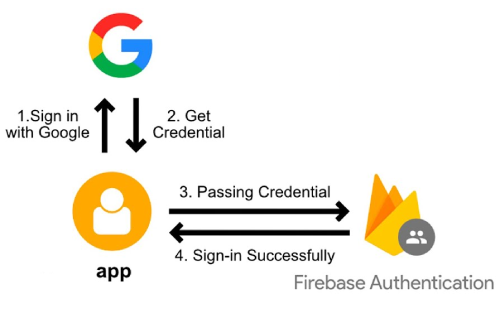
建立firebase連接
- 在src建立資料夾utils/firebase,裡面建立一個文件firebase.js
import { initializeApp } from 'firebase/app';
  import {getAuth, signInWithRedirect, signInWithPopup, GoogleAuthProvider} from 'firebase/auth';

  const firebaseConfig = {
    apiKey: "AIzaSyDxsH8mRs2bZgz1GwJEvSYRj7hoeORVD20",
    authDomain: "crwn-clothing-db-26f4f.firebaseapp.com",
    projectId: "crwn-clothing-db-26f4f",
    storageBucket: "crwn-clothing-db-26f4f.appspot.com",
    messagingSenderId: "1082510044596",
    appId: "1:1082510044596:web:be8fe9bfc03f31084f56e1"
  };

  // Initialize Firebase
  const firebaseapp = initializeApp(firebaseConfig);

  const provider = new GoogleAuthProvider();
  provider.setCustomParameters({
    prompt:"select_account"
  });

  export const auth = getAuth();
  export const signInWithGooglePopup = () => signInWithPopup(auth,provider);
Enable Google Sigin
- 將firebase的專案允許使用Google Sigin
Firebase Console > Project > Authentication > Sigin Method > Google
打勾 Enable
輸入專案名稱:project-crwn-clothing-web-app
輸入email:user@gmail.com
儲存
Sigin按紐
- 建立一個按紐來讓使用者用Google登入
import { auth,signInWithGooglePopup } from '../../utils/firebase/firebase';

const SignIn = () => {
  const logGoogleUser = async () => {
    const response = await signInWithGooglePopup();
    console.log(response);
  }
  return(
    <div>
    <h1>Sign In Page
    <button onClick={logGoogleUser}>Sign In With Google</button>
    </div>
  )
}

export default SignIn;
建立資料庫
- 建立firestore database
Firebase Console > 選定project > firestore database > Create database
打勾 Start in production mode > Next
選擇 firestore location: Taiwan > Enable
選擇 Rules
#修改成true,因為目前只有我們在用,之後會再修改
rules_version = '2';
service cloud.firestore {
  match /databases/{database}/documents {
    match /{document=**} {
      allow read, write: if true;
    }
  }
}
改完後,點選 > Publish
從App新增使用者
- 回到app的src/utils/firebase.js
import { getFirestore,doc,getDoc,setDoc } from 'firebase/firestore';
允許註冊帳號 Allow Email Signup
Firebase Console > 選定project > authentication > sign-in method > add provider >
點選 Email/Password 打勾enable > Save