Components
- Component
- render a component
- props and children
- state
- lifecycle
- array mapping
- pass data between components
Component
- components are like JavaScript functions. They accept arbitrary inputs (called “props”) and return React elements describing what should appear on the screen.
- functional component
const Welcome = (props) => {
  return <h1>Hello, {props.name}</h1>;
}
export default Welcome;
- class component
class Welcome extends React.Component {
  render() {
    return <h1>Hello, {props.name}</h1>;
  }
}
export default Welcome;
render a component
- a user-defined component must be imported before use
- In the
App.jsfile
import Welcome from './components/Welcome';

const App = () => {
  return (
    <Welcome name='Peter' />
  );
}

export default App;
props and children
- each component accepts a single “props” object argument that contains data passed from whoever is calling it
{this.props}is an object that contains variables and children{this.props.children}is used to display whatever you include between the opening and closing tags when invoking a component
import React, {Component} from 'react';
const Picture = (props) => {
  return (
    <div>
      <img src={props.src}/>
      {props.children}
    </div>
  )
}
const App(){
  return (
    <div className='container'>
      <Picture key={picture.id} src={picture.src}>
          //what is placed here is passed as props.children
      </Picture>
    </div>
  );
}
ReactDOM.render(<App />, document.getElementById('root'));
state
- state object is where we store key/value pairs and make changes to those values specific to that component
- Constructor is the only place where you can assign this.state directly. In all other places, use this.setState()
- when the state of an object changes, the component re-renders, however updates are not immediate(asynchronous) for performance
class Car extends React.Component {
  constructor(props) {
    super(props);
    this.state = {
      brand: "Ford",
      model: "Mustang",
      color: "red",
      year: 1964
    };
  }
  changeColor = () => {
    this.setState({color: "blue"});
  }
  render() {
    return (
      <div>
        <h1>My {this.state.brand}</h1>
        <p>It is a {this.state.color} {this.state.model} from {this.state.year} </p>
        <button type="button" onClick={this.changeColor} >Change color</button>
      </div>
    );
  }
}
passing event argument
class Counter extends Component{
  state = {count:0};
  handleIncrement = product => {
	console.log(product);
	this.setState({count: this.state.count++});
  };
  render(){
	return (
	<div>
	  <span className={this.getBadgeClasses()}>{this.formatCount()}</span>
	  <button onClick={()=>this.handleIncrement(product)} className="btn btn-secondary btn-sm">Increment</button>
	</div>
	);
  }
}
lifecycle
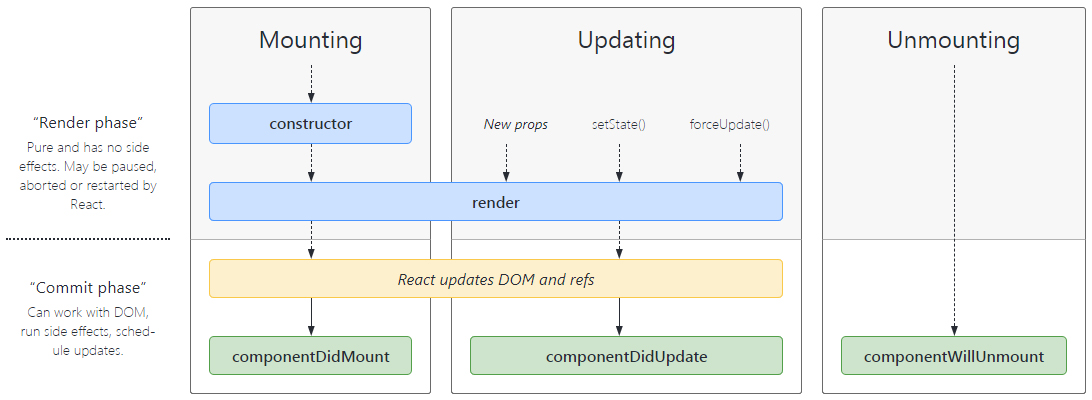
- Each component in React has a lifecycle which you can monitor and manipulate during its three main phases
- three phases are: Mounting, Updating, and Unmounting
- Mounting:constructor() -> getDerivedStateFromProps() -> render() -> componentDidMount()
- Updating:getDerivedStateFromProps() -> shouldComponentUpdate() -> render() -> getSnapshotBeforeUpdate() -> componentDidUpdate()
- Unmounting:componentWillUnmount()
Array mapping
- use the map() function to take an array and transforms it into lists of elements
import React, {Component} from 'react';

class Movies extends Component{
  state = {
	  movies:[
		{id:1,title:'Terminator',genre:'Action',stock:3,rating:4},
		{id:2,title:'Alien',genre:'Horror',stock:5,rating:3},
		{id:3,title:'Jurassic Park',genre:'Adventure',stock:10,rating:5}
	  ]
  };

  handleDelete = (movie) => {
	this.setState({movies: this.state.movies.filter(m=>m.id !== movie.id)});
  };

  render(){
	return (<>
	{this.state.movies.map(m=>
	  <tr key={m.id}>
	  <td>{m.title}</td>
	  <td>button onClick={()=>this.handleDelete(m)} className="btn btn-secondary btn-sm">Delete</button></td>
	  <tr>
	)}
	</>);
  }
}
export default Movies;