HttpRequest
- Request a website content
- Make an api call
- Decode api response
- Make an api call inside a webpage
- Using CURL to make api call
- Status code
- Using CURL to make api call to get weather data for London
- Request headers
- Response headers
- Request Methods
- Request Body
Request a website content
<? $response = file_get_contents("https://example.com");
echo $response;?>
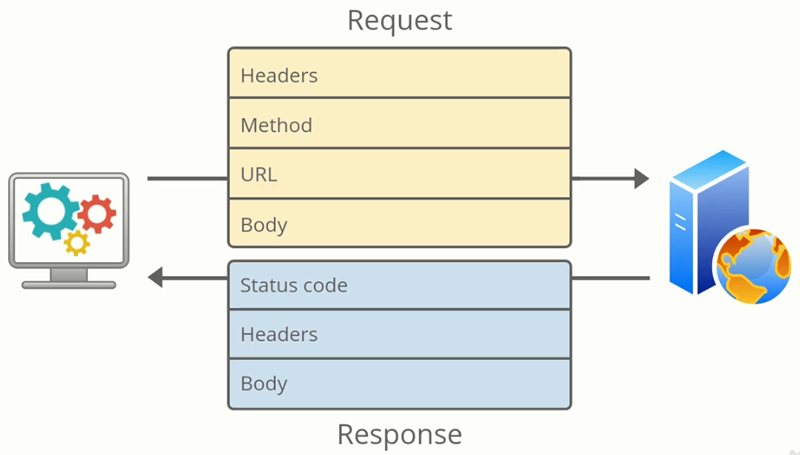
Make an api call
<? $response = file_get_contents("https://randomuser.me/api");
echo $response;?>
Decode api response
<? $response = file_get_contents("https://randomuser.me/api");
$data = json_decode($response, true);
var_dump($data);							//show the whole json object in an associative array
echo $data["results"][0]["name"]["first"];	//show one specific value
?>
make an api call inside a webpage
<? if(!empty($_GET["name"])){
	$response = file_get_contents("https://api.agify.io?name={$_GET['name']}"); 	//making api call
	$data = json_decode($response, true);											//getting the data in JSON format and turn into associative array (true)
	$age = $data["age"];															//storing the specific data we want in a variable
}?>

<!DOCTYPE html>
<html>
<body>
<?echo $age;?>	//displaying the result from the api call
<form>
	<label for="name">Name:</label><input name="name" id="name"><button >Guess age</button>
</form>
</body>
</html>
Using CURL to make api call
- file_get_contents may not be allowed in shared hosting, and requires a specific format for header
- CURL is a tool for trasferring data using URLs
- CURL can be used both in the command line and in your php code
<?
$ch = curl_init();											//initialize a curl session
curl_setopt($ch, CURLOPT_URL, "https://randomuser.me/api");	//setting url as a option
curl_setopt($ch, CURLOPT_RETURNTRANSFER, true);				//we want return response as a string
$response = curl_exec($ch);									//execute this curl request
curl_close($ch);											//close the handle
echo $response;												//output the response
?>
Status code
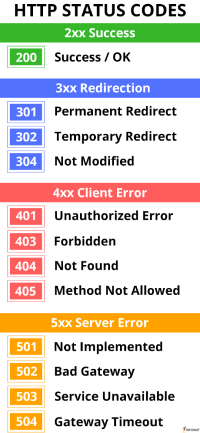
- aside from the body of response(payload), server returns a status code
- status code is a numeric value that tells us how the request went
<?
$statuscode = curl_getinfo($ch, CURLINFO_HTTP_CODE);	//using curl to get the status code
echo $statuscode;
?>
Using CURL to make api call to get weather data for London
- openweathermap.org gives the weather forecast for specific city
- need to register in order the get api key
<?
$ch = curl_init();											//initialize a curl session
curl_setopt($ch, CURLOPT_URL, "https://api.openweathermap.org/data/2.5/weather?q=London&appid=a0d396cee9f953695abd52991da9a2c1");
curl_setopt($ch, CURLOPT_RETURNTRANSFER, true);				//we want return response as a string
$response = curl_exec($ch);									//execute this curl request
$statuscode = curl_getinfo($ch, CURLINFO_HTTP_CODE);		//using curl to get the status code
curl_close($ch);											//close the handle
echo $statuscode,"<br>";									//output the status code
echo $response;												//output the response
?>
Request headers
- Client Request headers contains meta data about the request(e.g. address of the server, details about the client)
- can also be used to send authorization details(e.g. API key)
- Headers are simple key:value pairs
<?
$ch = curl_init();
$headers = ["Authorization: Client-ID O2GckUyoKCyckfFuxPZp7wP42UYxPT-B0AG8VVc_neE"];	//add api key in a request header
curl_setopt($ch, CURLOPT_URL, "https://api.unsplash.com/photos/random");
curl_setopt($ch, CURLOPT_RETURNTRANSFER, true);
curl_setopt($ch, CURLOPT_HTTPHEADER, $headers);											//pass header along with the request
$response = curl_exec($ch);
$statuscode = curl_getinfo($ch, CURLINFO_HTTP_CODE);
curl_close($ch);
echo $statuscode,"<br>";
echo $response;
?>
Response headers
- Server Response headers contains meta data about the response body such as length,language and type(html, JSON...)
<?
curl_setopt($ch, CURLOPT_HEADER, true);								//to print response header along with response body, we can specifiy that in our option
$contenttype = curl_getinfo($ch, CURLINFO_CONTENT_TYPE);			//to get the response header's content type using curl_getinfo
$contenttype = curl_getinfo($ch, CURLINFO_CONTENT_LENGTH_DOWNLOAD);	//to get the response header's content length using curl_getinfo
?>
Request Methods
- Method determines where the request goes
- default method of a form is GET
Request Body
- When a html form sends a POST request, the formData is sent in the request body
- e.g. create a new repository by sending a POST request to the github endpoint /user/repos
<?
$ch = curl_init();
$headers = ["Authorization: token YOUR_TOKEN"];
$payload = json_encode(["name" => "Created from API","description" => "an example API-created repo"]);	//create a body to be passed along with the request
curl_setopt($ch, CURLOPT_URL, "https://api.github.com/user/weili0505/repos");
curl_setopt($ch, CURLOPT_RETURNTRANSFER, true);
curl_setopt($ch, CURLOPT_HTTPHEADER, $headers);
curl_setopt($ch, CURLOPT_CUSTOMREQUEST, "POST");
curl_setopt($ch, CURLOPT_POSTFIELDS, $payload);	//attach the body to the request
$response = curl_exec($ch);
$statuscode = curl_getinfo($ch, CURLINFO_HTTP_CODE);
curl_close($ch);
echo $statuscode,"<br>";
echo $response;
?>