Asynchronous
How Javascript achieve asynchronicity
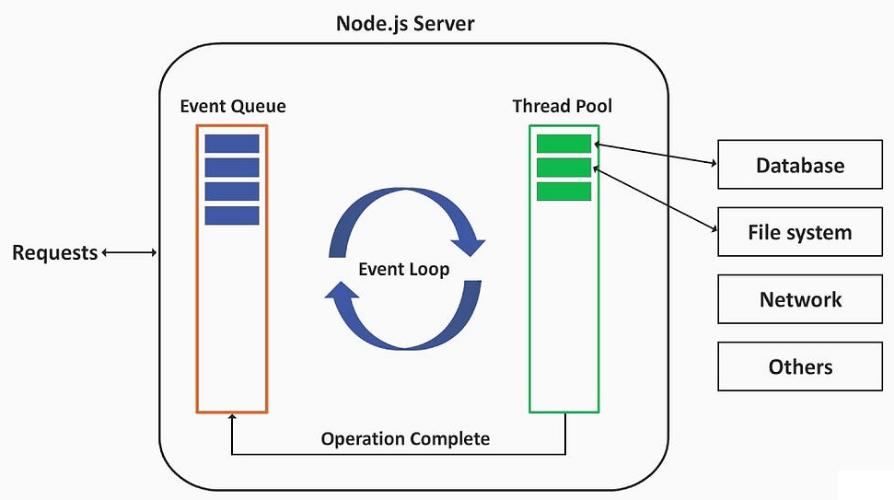
- At its core, JavaScript is designed to be non-blocking on the "main" thread, this is where views are rendered
- But JavaScript is synchronous by default and is single threaded. This means that code cannot create new threads and run in parallel
- Since JavaScript was born inside the browser, and the browser provides a way to do it by providing a set of APIs that can achieve asynchronous prgramming
- These APIs are called Callbacks
Callback
- A callback function is executed after another function has finished
function greet(name, callback) {
  console.log(`Hello, ${name}!`);
  callback();
}

function sayGoodbye() {
  console.log("Goodbye!");
}

greet("Alice", sayGoodbye);
Callback Hell
- when it is nested, callbacks are hard to track and difficult to debug
app.get(url, params, (data) => {
  // do something with data to get params2

  app.get(url2, params2, (data) => {
    // do something with data to get params3

    app.get(url3, params3, (data) => {
      // do the final task with data
    });
  });
});
Promise
- A Promise is an object hold the eventual result of an asynchronous operation
- When the operation was successful, resolve(result) is called
- When the operation was unsuccessful, reject(err) is called
- When consuming a promise, use ".then" and ".catch" to process both success and failure
let myPromise = new Promise((resolve, reject)=>{
// "Producing Code" (May take some time)
  resolve(result); // called when successful or
  reject(err);  // called when error
});

// "Consuming Code" (Must wait for a fulfilled Promise)
myPromise
 .then(result=>console.log(result))
 .catch(err=>console.log(err))
Promise Object
const p = new Promise((resolve, reject) => {
  // 執行一些非同步作業,最終呼叫:
  //
  //resolve(result); // 實現
  //或
  //reject("failure reason"); // 拒絕
});
Async/Await
- async and await make promises easier to write
- async makes a function return a Promise
- await makes a function wait for a Promise
const getData = async () => {
    let y = await "Hello World";
    console.log(y);
}

getData();
Error handling in Async/Await
const fetchData = async() => {
  try {
    let response = await fetch('https://api.example.com/data');
    let data = await response.json();
    console.log(data);
  } catch (error) {
    console.error('Error fetching data:', error);
  }
}
TryCatch Handler middleware
- This avoid repeating the try/catch code in each route
- Inside the middleware folder create a file called trycatchHandler.js
const trycatchHandler = fn => (req,res,next) =>
	Promise
	.resolve(fn(req,res,next))
	.catch(next)
module.exports = asyncHandler;

//then we can use it in each route by wrapping async inside the middleware
const trycatchHandler = require('../middleware/trycatchHandler');

router.get('/', trycatchHandler( async (req,res,next)=>{
    const result = await Product.find();
    res.status(200).json({success:true,count:result.length,data:result});
}))
Replace TryCatchHandler with express-async-errors
$ npm i express-async-errors
//then we can remove trycatchHandler in all routes
router.get('/', async (req,res,next)=>{
    const result = await Product.find();
    res.status(200).json({success:true,count:result.length,data:result});
});