Model
- stored in the app/models directory
- Eloquent is an object relational mapper (ORM) that is included by default within the Laravel framework
- An ORM is software that facilitates handling database records by representing data as objects
- Each database table has a corresponding "Model" which is used to interact with that table
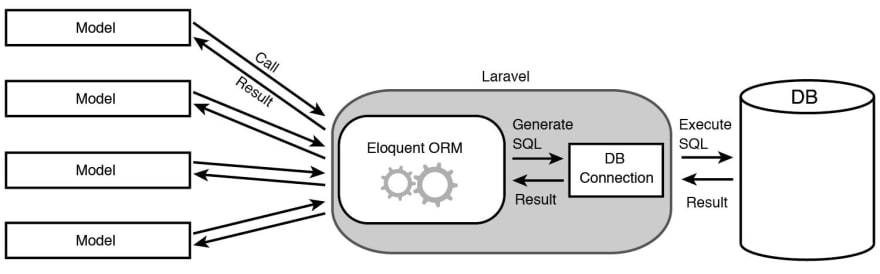
Create a new model
- Model can be created using make:model command
- migration file is located at database/migrations
php artisan make:model BlogPost -m //generate a model and migration file(-m)
- click on the latest created migration file inside the databaes/migrations folder, and add 2 columns
public function up(){
        Schema::create('blog_posts', function (Blueprint $table) {
            $table->id();
            $table->timestamps();
            $table->string('title');	//add this column
            $table->text('content');	//add this column
        });
    }
- apply this migration into the database
php artisan migrate					//insert new model to the database
php artisan migrate:rollback		//revert the most recent database change
- check MySQL Workbench to see that the new table is created successfully
Insert a new row
- Tinker is a powerful REPL(Read–Eval–Print Loop) for the Laravel framework
- We can use tinker in the command line to insert a new row
php artisan tinker
>>> $post = new BlogPost();				//create a new instance of BlogPost Class
>>> $post->title ='I am the title';		//set the properties for this instance
>>> $post->content ='I am the content';
>>> $post->save()						//save the instance
Retrieving a row
php artisan tinker
>>> $post = BlogPost::find(1);			//get the element with id of 1
Retrieve multiple rows
- Use the Model::all() method to get all data from table
- Use the Model::find([]) method to get specific data from table
php artisan tinker
>>> $posts = BlogPost::all();			//get all records in this table
>>> $posts[0];							//get the first element
>>> $posts->first();					//get the first element
>>> $posts->count();					//get the total number of elements
>>> $posts = BlogPost::find([1,2,3]);	//get the element with id of 1,2 or 3
Create random data for the user table
- Use the create() method to generate random data using Laravel model factory
php artisan tinker
>>> User::factory()->count(5)->create();
Get rows using SQL
- Use Query Builder to select specific rows that met the criteria
- where():
- orderBy():
- get():
php artisan tinker
>>> $users = DB::table('users')
                ->where('votes', '=', 100)
                ->where('age', '>', 35)
                ->get();