Environment
XAMPP
- XAMPP:stands for cross-platform, Apache, MySQL, PHP and Perl
- go to apachefriends and download XAMPP
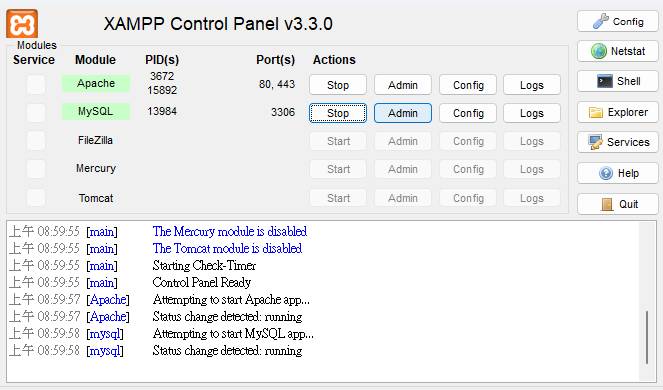
- install and start apache and mysql servers
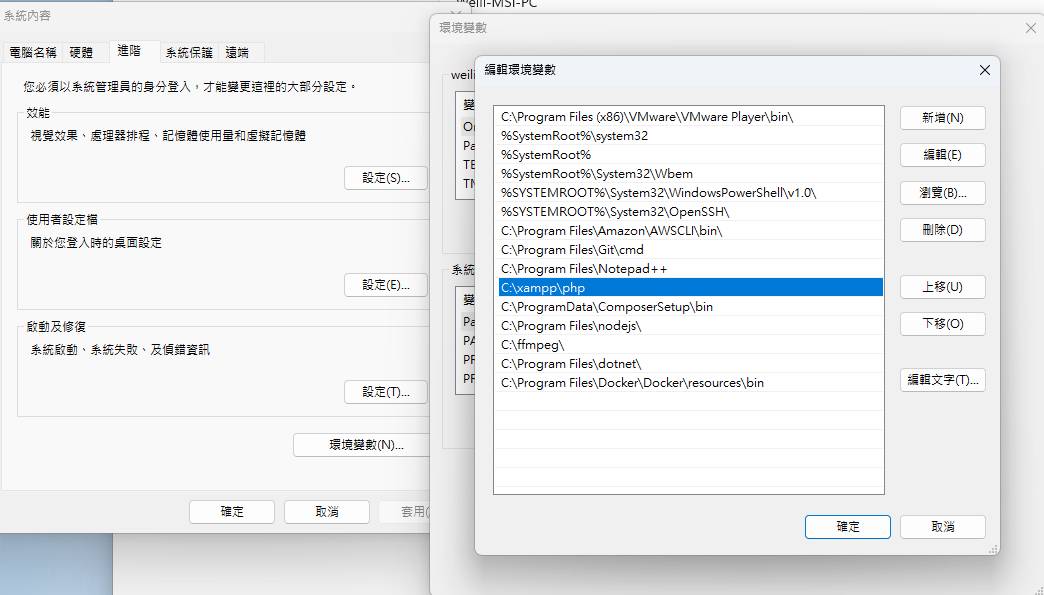
 -add php into the PATH environment variable
 -restart terminal to check if installation was successful
php -v
Composer
- a tool to manage php dependencies
- go to Composer and download Composer
- restart terminal to check if installation was successful
composer -V
Create a new project
- open terminal, navigate to your desired folder
composer create-project laravel/laravel="8.4.0" project1
- open VSCode, open this new project folder
- open terminal in VSCode, start the development server
php artisan serve
- open browser go to url http://localhost:8000/
.env file
- contains environment variable settings such as database username and password
- located at the root folder of your project.
Connect to MySQL
- Windows:use MySQL Workbench
- Mac: use Sequel Pro, TablePlus
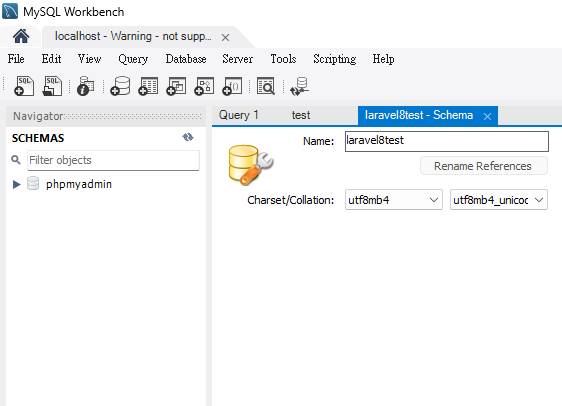
- Open MySQL Workbench and create a new schema (e.g. laravel8test), make sure you specify charset to utf8mb4-unicode
- open .env file at the root folder of your project
DB_DATABASE=laravel8test
open terminal and run the following command
php artisan migrate
open Workbench and refresh tables